Connect your distribution channels
The two-zone platform catalog — Your platforms, Add a platform — Booking.com and Airbnb today, the rest on request; the six-step wizard, states that only advance on proof, and the Booking.com reports on a reservation.
The Distribution channels page — Sales & marketing menu, Channels entry — has two zones. Your platforms shows a card for every configured platform, with its state, its last sync and its settings; empty at first. Add a platform offers, as a dropdown, the platforms still to connect — Booking.com and Airbnb today, the only two really open; the rest of the catalog is listed further down, without being promised. Further down still, iCal calendars & other channels covers platforms with no direct connection: importing and exporting availability, nothing more. One principle governs the whole screen: no state advances on a promise. A card's badge comes from the server, and Last sync only appears once a push has really succeeded — otherwise the card says Never synced.
The connection wizard, step by step
Open the Channels page
The page opens on its two zones. Your platforms stays empty until a platform is configured. Under Add a platform, the dropdown only lists platforms not yet configured — Booking.com and Airbnb today; choosing one and confirming opens the wizard at the step your account has really reached, never beyond it, and its card appears in Your platforms. A setup already begun shows Continue setup there, a connection in error Resume connection, a finished one Manage.
Screenshot to be produced
captures/connecter-canaux-ota/01-catalogue-deux-zones.png
Introduction
The wizard opens, titled Connect followed by the platform's name, with its step rail: Introduction, Listings, Connection, Confirmation, Mapping, Sync. Start moves on to the next one.
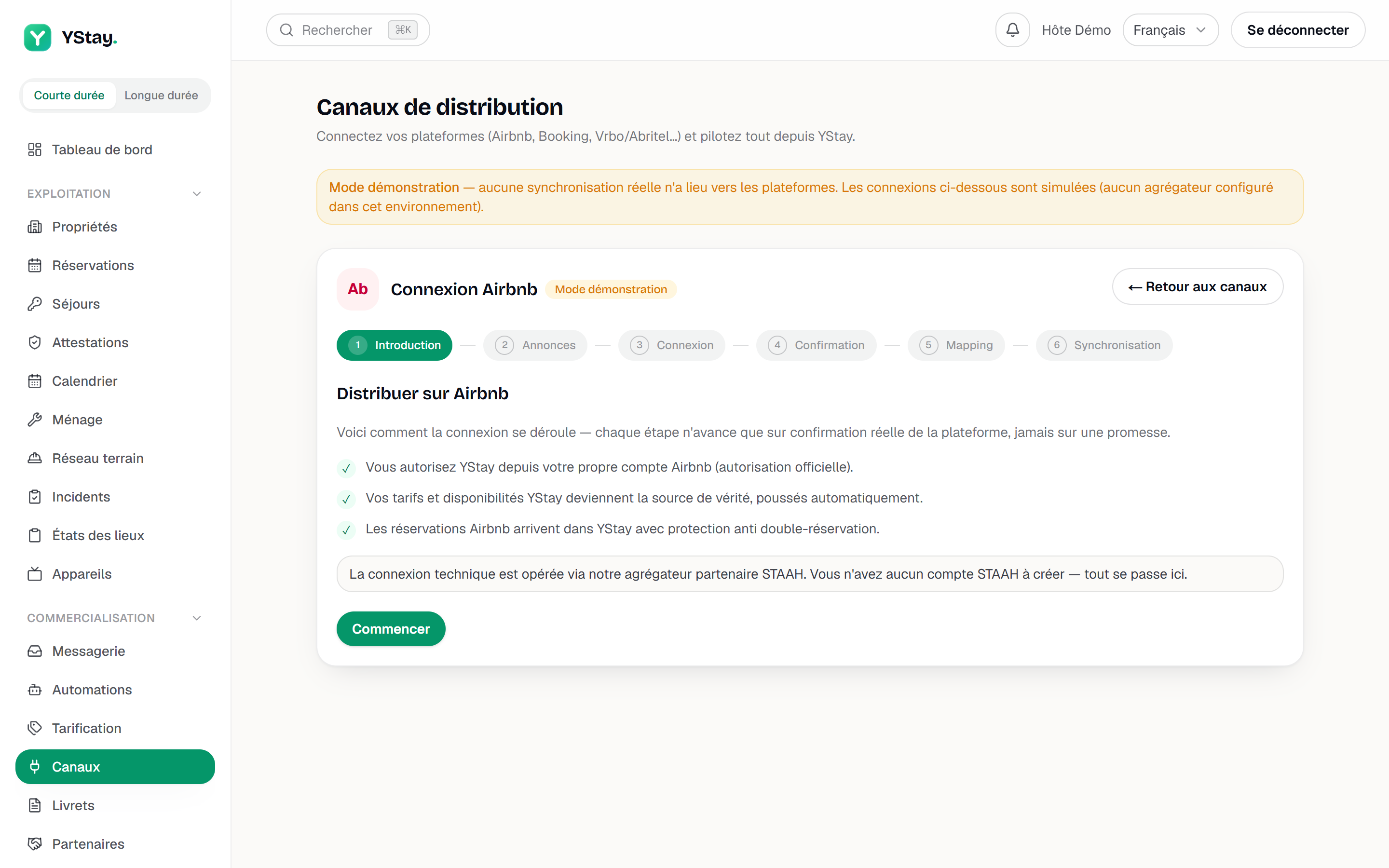
The first step of the connection wizard. Listings
Choose the listings to distribute only lists your published listings. Distribute, on a row, creates the remote inventory — property, room type, rate plan — and the row turns to Provisioned; there is nothing to do on the platform side. With no published listing, the step says so and will not let you continue. Distribute does not send the photos: they go out to the channels with the rest of the listing's content when that content is synchronised — when an already-distributed listing is (re)published and each time the listing, its photos or its amenities are edited; after Distribute, it is therefore the first edit of the listing, its photos or its amenities (or a new publication) that sends them — only for a published listing, and in this order: the cover photo first, then the listing's areas.
Connection
This step changes entirely from one platform to the next. On Airbnb, Authorize on Airbnb opens Airbnb's official authorization on Airbnb's own site: you sign in there, grant access, then come back here. If Airbnb answers that another channel manager already manages your account, disconnect it at Airbnb first; and on a test environment, the wizard states that this authorization is not available there.
On Booking.com, everything is prepared in your extranet: open “Account”, then “Connectivity provider”, select the provider the wizard names, accept the connectivity (XML) agreement and note your Booking.com Hotel ID. Entered in the field of the same name, Test the connection answers straight away — “Connection verified: the property is reachable.” or “Property not found”. Once the request has gone out, the card shows Waiting for the OTA: YStay checks on its own at regular intervals, Restart the check asks for proof again, and the state will never advance without it.
Confirmation, mapping and first sync
Proof received, the step shows Connection confirmed and offers Continue to mapping: the only moment the state turns to Connected. Link your listings then puts the channel's listings side by side with your YStay ones — Link on each row, then a button confirms all the mappings on the platform; Import channel listings brings down those that existed before YStay. What remains is Start the first synchronization, which goes through a queue: Refresh follows the real state, Sync active only appears on the first push that genuinely succeeded, and Finish closes the wizard.
What a channel's state means
The table below describes a platform's card in Your platforms, once configured.
| The state shown | What it means |
|---|---|
| Not connected | Nothing has been attempted on that platform yet. |
| Ready to connect | At least one listing is provisioned; the connection can be started. |
| Waiting for the OTA | The request has gone out, the platform has not confirmed yet. |
| Connected | The platform has confirmed — mapping opens. |
| Listings mapped | Listings are linked and confirmed; the sync is still to be started. |
| Sync active | A push of rates and availability has really succeeded. |
| Connection declined | The platform rejected the request; the card offers Resume connection. |
| Sync error | A push failed; same resume button. |
Disconnect removes the connection at the aggregator but keeps your provisioned listings and the history of imported reservations.
When a sync fails
A Sync failures panel appears at the top of the page as soon as a push has failed. Each row names the listing and the channel, shows the platform's message, groups repeated attempts into a counter and dates the latest; Retry replays that one push. Archive resolved errors removes from the view the failures already superseded by a successful sync of the same flow, the history itself being kept — and if archiving answers “No resolved error to archive — the failures shown are still active.”, nothing has been fixed: retry rather than hide.
Rejections reported by the channels
A Rejections reported by the channels panel can appear on the Channels page, next to the Sync failures panel seen above. The two differ in when the failure happens: a sync failure is an exchange with the aggregator that did not go through, in either direction — connection impossible, format refused, push rejected outright by the aggregator, reply, catch-up or Booking.com report not delivered, received review impossible to attach to a listing; a rejection reported by a channel happens after an accepted push — the aggregator had taken the update on board, then the channel rejected it afterwards — a rejection the aggregator records on its failure log.
The exact reason is not shown: the row states that the channel did not report one. The provider's technical record, when there is one, is not rendered in the interface: it is kept in our logs for support. If the block persists, the reference to copy (below) identifies the property and channel concerned to support.
Restart synchronization replays — for the whole property, across all its channels — every push currently in failure, not just the one shown on the row; a confirmation names the property before sending. Between two restarts on the same property, allow 10 minutes: requested too soon, the request says so instead of going out. If the channel itself refuses a further restart, the panel states it plainly and offers a reference to copy (field Reference to send to support, button Copy the reference), to pass on to your contact if the block persists.
Booking.com reports
This part does not live on the Channels page but on a reservation's page, in the Booking.com reports card — which only appears on a reservation that came from Booking.com. These are the channel's own official actions, sent through our connectivity partner: YStay does not invent them.
Four actions exist, in this logical order. Report a no-show attests that the guest did not show up and protects your fees; that report brings out the No-show fees row, which asks for one explicit, single choice — Waive the fees or Keep the fees, and once sent that choice never turns back into two buttons. Report an invalid card asks Booking.com to have another one entered. Finally Cancel the reservation, the only Booking.com-side cancellation you can trigger from YStay, requires that invalid-card report and then the delay imposed by the channel.
Every action opens a confirmation before being sent. Once gone, it stops being a button and shows its exact milestone: “Sent to Su on … — queued for processing”; the card never claims Booking.com has confirmed, the channel's answer being asynchronous. A row the channel does not allow right now shows Not currently available, an eligibility computed server-side on Booking.com's real windows. A refusal reads in plain words: window closed, report already sent, cancellation without an invalid card reported, delay not elapsed, action unavailable for this channel — or a reservation imported before reporting was enabled, hence with no channel reference.
Next
- Translate and distribute the listing — the listing's Distribution card, upstream of this page.
- Take your first reservation and run your calendar — a reservation that came from a channel stays governed by that channel.
- Reply to your guests (inbox) — messages from the platforms and replies pushed back to the channel they came from.
- Listings — the rest of the section.
Updated on